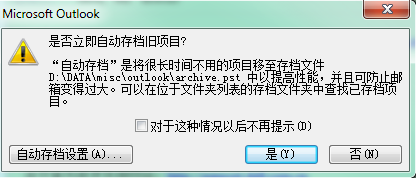
如何在邮箱中配置自动存档
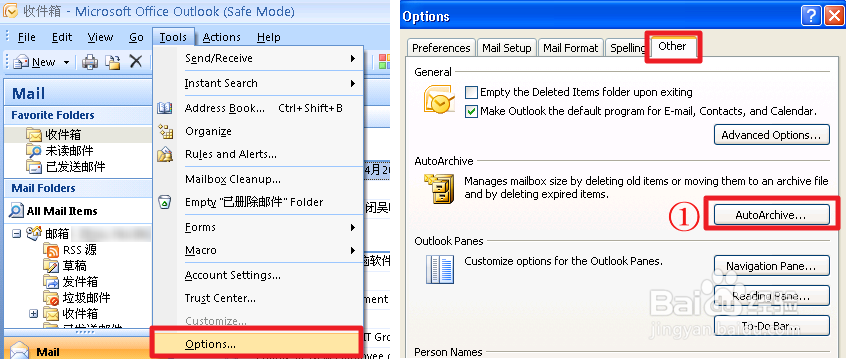
1、Outlook 2007: Click Tools → Options, Click Other → Auto Archive…
点击 工具 → 选项,点击 其他 → 自动存档
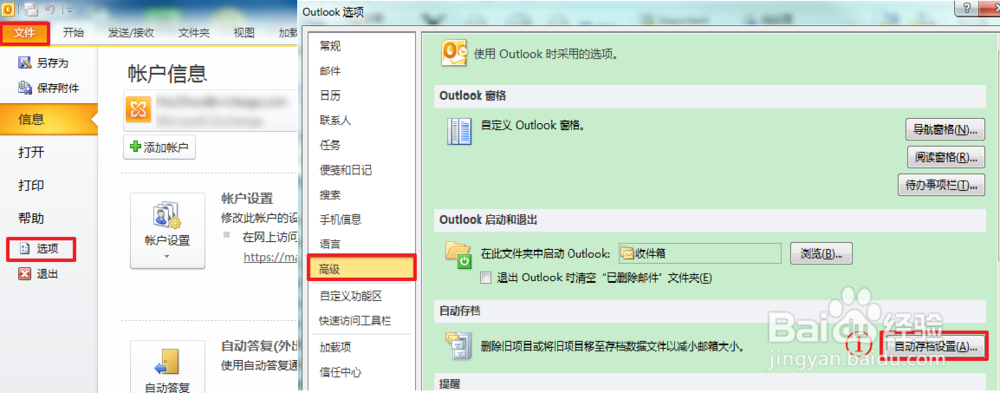
Outlook 2010: Click File → Options, Click Advance → Auto Archive…
点击文件 → 选项, 点击 高级 → 自动存档
2、Select “Run AutoArchive every _ _ days”, Accroding your situation to select time.
打勾“自动存档时间间隔为__天”,根据自己的情况填写时间
Select “Prompt before AutoArchive runs”, “Archiveor delete old items” and “Show archive folder in folder list”
打勾“运行自动存档前提示”,“存档或删除旧项目”“在文件夹列表中显示存档文件夹”
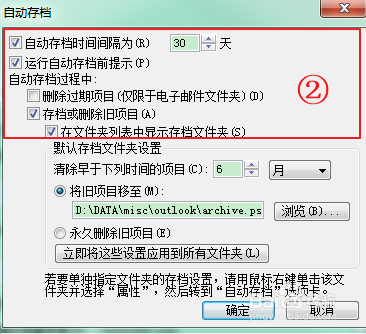
3、Type a time,Click “Browse”, select a archive file to save the old items.
输入一个时间,点击“浏览”,选择一个存档文件来保存旧的邮件。
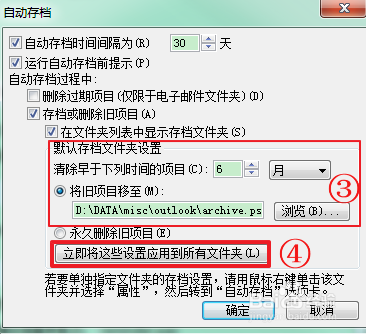
4、Click “Apply these settings to all folders now”, and Click OK
点击“立即将这些设置应用到所有文件夹”,点击确定
5、After a period of time, when the belew window appear,please click “Yes”, then the program will archive the items automatically.
过一段时间后,当弹出下面窗口时点击是,软件会自动存档你的邮件。